
Roblox continues to evolve as one of the most popular online platforms for creativity and social gaming, and a major part of that evolution is safety. The company has built its ecosystem around the idea that connection and creativity thrive best when users feel secure. With families and younger players making up a large portion of the community, Roblox has expanded its parental controls and safety systems to give parents and caregivers more insight and control over how their children experience the platform.
Safety Tools for Younger Players
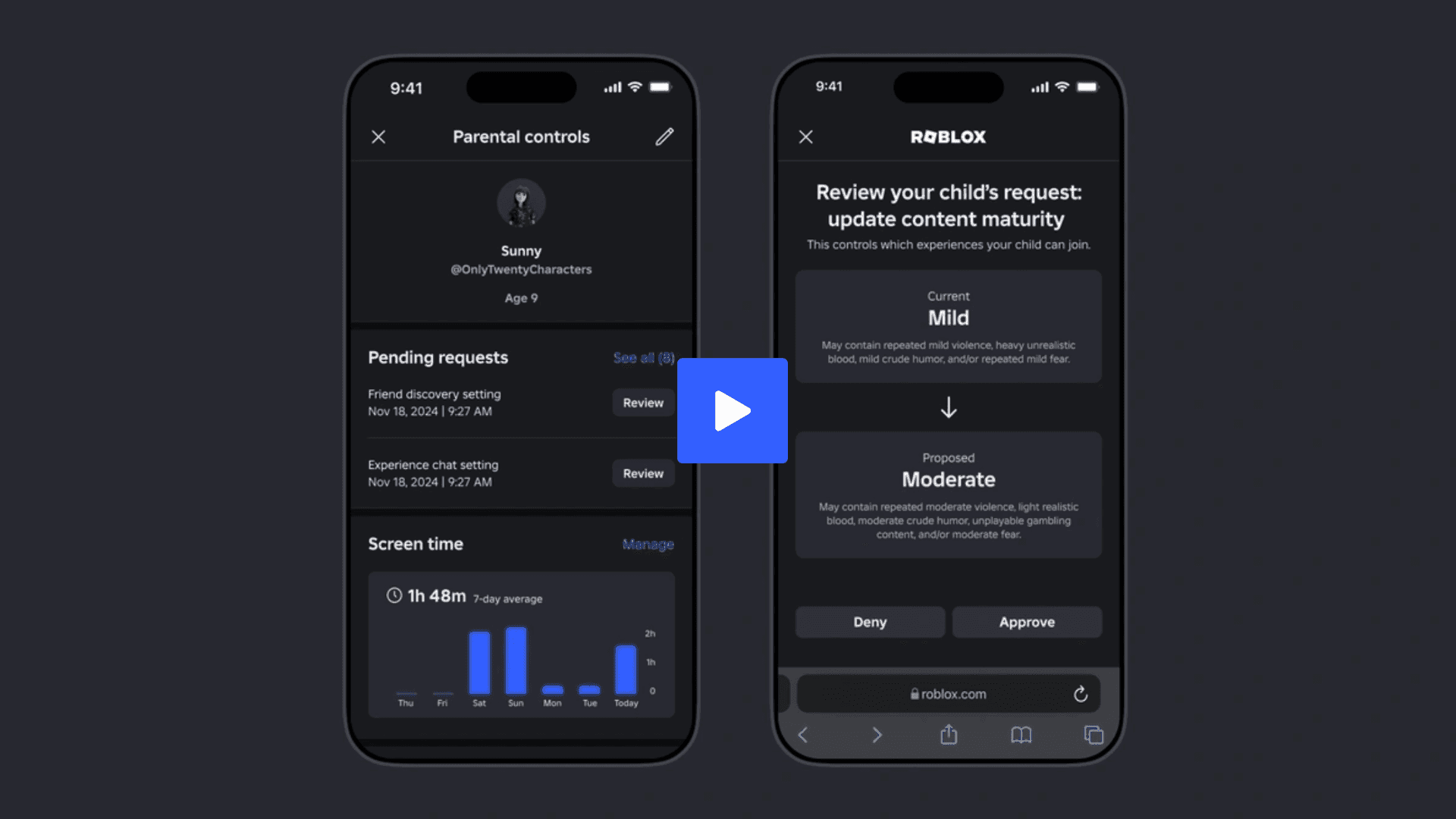
For players under 13, Roblox includes a series of restrictions and default settings designed to protect their online experience. Parents can access Parental Controls to adjust privacy settings, communication options, and content filters. These controls let parents decide how their children interact with others and what kind of experiences they can access.
Children under 9 need parental approval to explore experiences labeled with “Moderate” content maturity. Roblox uses a tiered maturity labeling system to categorize content and help parents make informed choices. Additionally, users under 13 are restricted from using certain features, such as voice chat, to minimize exposure to unfiltered communication.
Communication for this age group is closely moderated. Roblox’s automated systems and human moderation teams work together to review chats and detect inappropriate behavior. Parents can also manage who can see their child’s online activity and who they can connect with, further tightening safety measures.
Tools and Transparency for Teen Users
Roblox’s approach changes as players grow older. For users aged 13 and above, the platform opens up new tools that balance freedom with safety. Teen accounts can access experiences rated “Minimal,” “Mild,” or “Moderate” by default, while more mature experiences are restricted to verified users aged 17 and older.
To make sure these limits are followed, Roblox uses age estimation technology. This feature helps confirm a user’s age before unlocking features like Trusted Connections or Party voice chat. Trusted Connections gives older users more control over who they chat with and allows unfiltered communication only with people they know and trust.
Parents who have linked their accounts to their teen’s profile can monitor who their child interacts with through these connections. This system aims to maintain transparency between parents and teenagers while supporting social engagement in a secure environment.
Encouraging Digital Balance
Beyond safety, Roblox has introduced several tools to help users manage how they spend time on the platform. The Do Not Disturb feature lets players mute notifications for certain periods, making it easier to focus or rest without distractions. Screen time insights show players how much time they’ve spent in different experiences, helping them understand and manage their digital habits.
Players can also set personal limits for how long they want to stay active on Roblox. For parents, these same tools serve as an extension of the Parental Controls dashboard, offering ways to balance playtime with other activities in a child’s day.
Do Not Disturb Mode: Allows users to silence mobile notifications for specific periods, helping maintain focus or rest.
Screen Time Insights and Limits: Displays how much time users spend on Roblox and which experiences they engage with most. Users can also set time limits to encourage balanced digital activity.
How Parents Can Link Accounts
Linking a parent’s account with their child’s Roblox account is the first step toward enabling full Parental Controls. The process starts when the child sends a request from within their Roblox app. Once linked, parents gain access to all available settings, including limits on spending, content maturity, communication, and screen time. This system allows parents to directly influence how their child engages with Roblox while maintaining an open line of communication about online behavior.
Set spending and screen time limits
Manage content maturity access
Review and manage connections
Adjust privacy and communication settings
Roblox’s Ongoing Safety Commitment
Roblox has made safety a defining feature of its platform. With regular updates to moderation systems, privacy options, and parental insights, the company continues to prioritize player well-being. Its tools for communication control, age verification, and digital balance aim to make Roblox a space where creativity and community can coexist with responsibility and awareness.
As Roblox continues expanding into new technologies and experiences, including elements of immersive 3D creation and web3 integrations, maintaining a secure environment remains a core priority. The platform’s current safety framework highlights its goal of providing a trusted space for players of all ages to create, play, and connect responsibly.
Check out Roblox Gift Cards on Amazon here.
Learn about other popular Roblox experiences here:
Frequently Asked Questions (FAQs)
How do I turn on Parental Controls on Roblox?
Parents can activate Parental Controls by linking their Roblox account with their child’s account. Once linked, parents can adjust settings related to communication, content access, spending, and screen time through the Parental Controls dashboard.
What age restrictions exist on Roblox?
Users under 13 have limited communication and content access by default. Experiences labeled with higher maturity levels, such as “Moderate” or “Restricted,” are only available to users who meet the required age threshold. Restricted experiences require users to be 17 or older and ID verified.
Can parents see who their child interacts with on Roblox?
Yes. When a parent’s account is linked to their child’s account, they can view the child’s connections and, for teens, their Trusted Connections. This helps parents stay informed about who their child communicates with on the platform.
Does Roblox have tools to manage screen time?
Yes. Roblox provides built-in tools that track total playtime and allow both users and parents to set limits. The platform also includes a Do Not Disturb mode to silence notifications during focus or rest periods.
How does Roblox verify age?
Roblox uses age estimation and ID verification technologies to confirm a user’s age before unlocking certain features, such as unfiltered chat or access to mature-rated experiences. This system ensures age-appropriate access across the platform.
Is Roblox safe for kids?
Roblox includes extensive safety features, content moderation systems, and parental tools to protect children. When combined with active parental involvement, these measures help create a secure environment for young players to explore and create.