

Building your first Alchemy Factory base can feel overwhelming when you're staring at empty space wondering how to organize everything. You're not alone. Most players rebuild their entire setup multiple times before discovering the power of reusable blueprints. Here's the thing: seven specific blueprint designs will carry you from struggling with basic production all the way through mid-game automation without constant rebuilding headaches.
These aren't just random builds. Each blueprint solves a specific bottleneck you'll hit during levels 1-4, and they stack (literally) to scale with your growing needs. Whether you need 90 plant ash per minute or want to automate fertilizer production while you sleep, these designs have you covered.
The Importance of Blueprints
Blueprints in Alchemy Factory save your custom structures for instant reuse. Press F to copy any structure, then H to access the blueprint menu where you can name and save it. The game stores these as .af files in your Blueprint folder, making them shareable with other players through the Alchemy Factory Discord.
Tip
Blueprint files from the demo version won't transfer to early access. Start fresh and build your library properly from day one.
You can stack most blueprints vertically by copying them and placing higher, though some designs require slight modifications for vertical expansion. This becomes crucial when you need triple production without tripling your factory footprint.
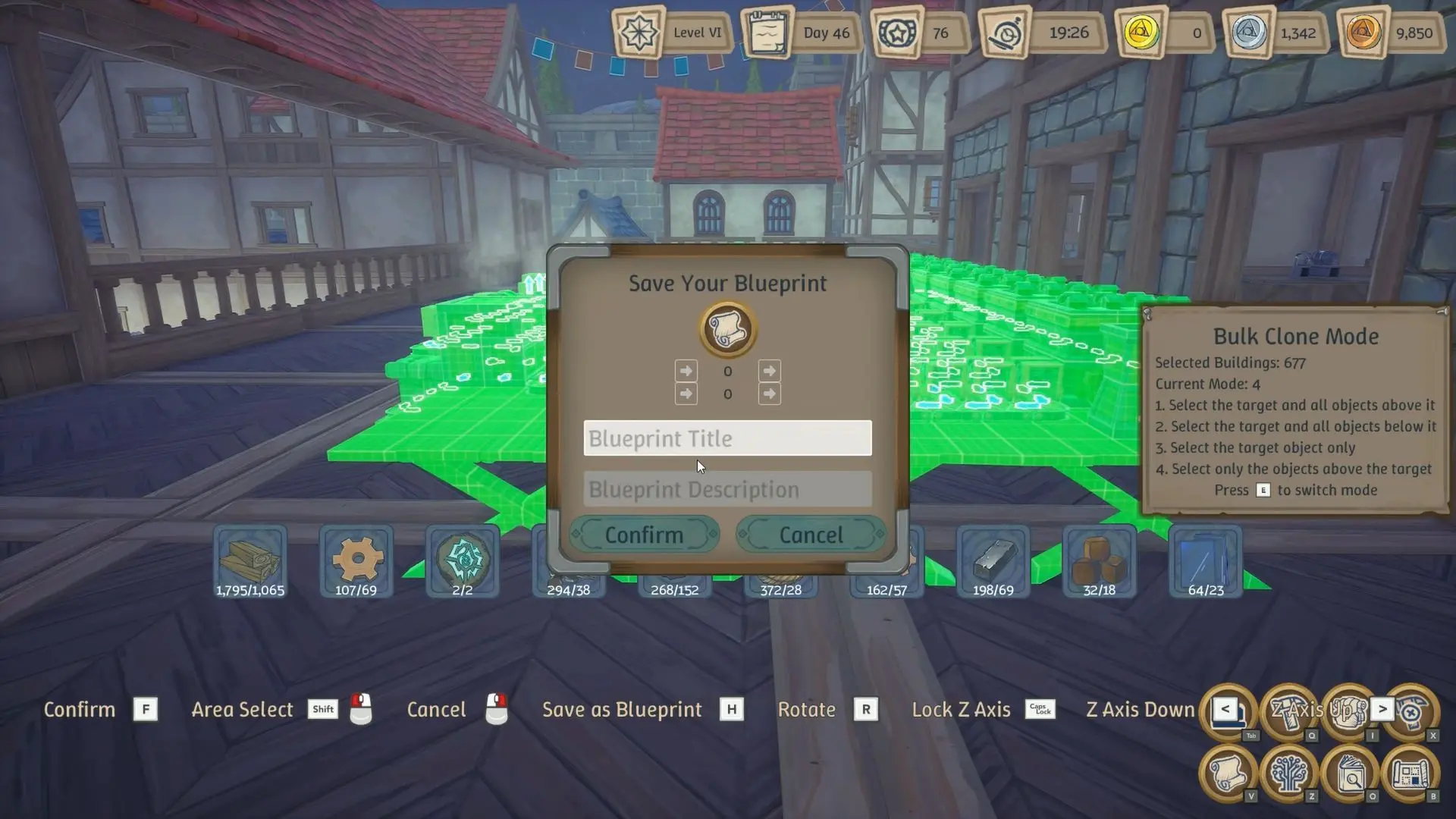
Alchemy Facotry Blueprints
Blueprint #1: The 90 Plant Ash Generator
This compact design generates exactly 90 plant ash per minute using minimal resources. You'll need wood blocks, shelving units, table saws, furnaces, and crucibles arranged in a specific three-column layout.
Building the Foundation
Start with three vertical wood pillars separated by four blocks each. Each pillar rises three blocks high (four for the crucible column). The key trick involves placing shelves on walls first, then using Caps Lock to slide them into position on your pillars.
Column layout breakdown:
Connect three conveyors from the table saws to one side, three to the other. These belts must stay separate because each generates 90 output, and standard belts only handle 90 speed. Merge them too early and you'll create bottlenecks.
Warning
Furnaces and crucibles sit taller than other machines. Always build their column one block higher or equipment won't fit properly.
The center column holds two chests with inputs facing the wall. Connect sage from these chests up to the conveyor belts feeding your table saws. This creates a self-contained loop that processes sage automatically.
Blueprint #2: Stackable Nursery for Any Crop
Every production chain needs plants. This nursery blueprint works for flax, sage, and red currant with zero modifications beyond swapping the crop type. The stackable design means you can triple output by copying upward.
Place nurseries in rows with inputs running down the center and outputs splitting left and right. This symmetrical layout makes belt routing simple and keeps everything organized at a glance. You'll connect fertilizer to the center input line and harvest from both sides simultaneously.
The beauty here is flexibility. Build one for flax today, copy it for sage tomorrow, then stack three sage nurseries when you need massive production for turquoise potions. Each nursery feeds directly into your processing chains without manual intervention.
Important
Leave chest placement flexible. Different setups need different storage positions, so add chests after placing the blueprint rather than including them in the saved design.
Blueprint #3: Efficient Clay and Brick Production
Clay and brick production eats resources fast. This blueprint combines crushers, table saws, charcoal processors, and kilns into one compact unit that generates both materials efficiently.
You need four table saws stacked vertically (yes, you can stack them) feeding into charcoal production. Three crushers process stone into sand at 180 per minute. Everything funnels into kilns that output finished bricks ready for construction.
The sand component deserves special attention because nearly everything requires sand. Clay needs it. Turquoise needs it. You'll burn through sand faster than you expect, making the crusher section your most important investment.
Tip
This blueprint works at half capacity if you only need moderate brick production. Remove two table saws and one crusher to save resources while maintaining functionality.
Blueprint #4: The 180 Sand Tower
Speaking of sand, this stackable crusher shelf generates 180 sand per minute using 500 wood, 176 nails, 36 large gears, 41 rope, and 103 stone. That sounds expensive until you realize two of these assemblers can feed your entire early game operation.
The vertical design stacks crushers on shelving units with conveyors running between levels. Stone enters at the top, sand exits at the bottom, and everything processes automatically. Build it once, copy it twice, and you'll never worry about sand shortages again.
Materials breakdown:
This blueprint pairs perfectly with your clay production because both systems share the same sand source. Connect them directly and watch your brick output soar without constant manual refilling.
Blueprint #5: Compact Quicklime Powder
Fertilizer drives everything in Alchemy Factory. Without it, your nurseries sit empty and production stops. This blueprint uses six crushers, six table saws, and eighteen crucibles to generate quicklime powder, which combines with other materials to create fertilizer.
The straight-line layout makes building simple. Crushers process stone, table saws handle wood, crucibles combine everything into quicklime powder. Connect stone input on one end, wood on the other, and collect finished powder from the center.
Running costs seem high initially, but money flows freely once you start selling potions. The real value comes from never worrying about fertilizer again. Your nurseries stay fed, your plants keep growing, and your production chains never stall waiting for basic materials.
Blueprint #6: The Improved Quicklime Compact
This advanced version generates 180 quicklime powder using a compact square design instead of the straight layout. You'll need more iron ingots and resources, but the space savings prove worth it when you're building multiple production zones.
The square configuration places crucibles around the perimeter with crushers and table saws in the center. Conveyors spiral inward, creating a visually satisfying production flow that's also incredibly efficient. Stone enters from the back, everything processes in the middle, and finished powder exits at designated collection points.
Use this blueprint for your major production facilities: turquoise potions, soap, and vitality potions. Each of these high-value items needs consistent fertilizer supply, and this compact design delivers without eating your entire factory floor.

Pro Tip: This blueprint looks boxy but saves massive space compared to straight designs. When you're building three separate production chains, that space savings becomes critical.
Blueprint #7: Stackable Assembler Production
Eight assemblers arranged in a stackable grid form the backbone of fertilizer production. This blueprint handles basic fertilizer and advanced fertilizer with simple input changes. Stack multiple copies vertically when you need triple output without expanding horizontally.
The center area holds input chests and distribution systems. Assemblers ring the perimeter for easy access and maintenance. Each level operates independently, so you can run different fertilizer types on different floors if needed.
This design shines during mid-game when you're juggling multiple plant types. Flax needs fertilizer. Sage needs fertilizer. Red currant needs fertilizer. Build three levels, assign each to a specific crop chain, and watch your automation reach new heights.
Bonus Compact Blueprints
Three additional compact designs deserve mention for their incredible space efficiency:
Stackable Rope Production uses minimal footprint to generate rope from flax. Copy it upward when you need more rope for conveyor expansion.
Compact Green Potion creates health potions from sage and flax in a tiny 3x3 space. Stack five copies and you'll generate more potions than your shop can sell.
Compact Linen processes flax into linen thread efficiently. This blueprint includes built-in storage but leaves chest placement flexible for custom configurations.
All three stack vertically without modifications. Build one, test it, then copy upward as your needs grow. The modular approach means you're never locked into a single production rate.
How to Access and Share Blueprints
Press Q to open the Build menu, then select the Blueprints tab below the Build tab. Your saved blueprints appear here ready for placement. Select one, position it at your base, and click to confirm placement.
Sharing blueprints requires accessing your game directory and finding the Blueprint folder. Files use the .af extension. Copy these files to share with friends or download blueprints from the community Discord server.
Important
When receiving blueprint files, save them in your Blueprint folder so the game detects them automatically. Restart the game if new blueprints don't appear immediately.
The Alchemy Factory Beginners Guide covers additional automation strategies that complement these blueprints perfectly.
Putting It All Together
These blueprints work as a system, not isolated builds. Your sand tower feeds clay production. Clay production needs quicklime from your compact design. Quicklime requires plant ash from your generator. Everything connects through fertilizer production that keeps nurseries running.
Start with the plant ash generator and nursery blueprint. These two unlock basic automation immediately. Add the sand tower next because you'll need sand for multiple chains. Build clay production when you start expanding your base with brick structures. Save the assembler grid and quicklime designs for when you're ready to automate fertilizer completely. These require more resources but pay dividends by eliminating manual fertilizer crafting forever. The compact rope, potion, and linen blueprints slot in wherever you need them. Stack them near your shop for easy restocking or build dedicated production zones away from your main factory.
Most importantly, don't rebuild from scratch when you need more output. Copy your existing blueprints and stack them vertically. That's the whole point of building modular from the start.